Page 1 of 1
Wode Autoboot
Posted: Fri Nov 23, 2012 1:20 pm
by andzlay
Hey!
I was wondering if it's possible to select some specific .iso to autoboot it with wode. I have swiss in mind...
In the wode config I can select as autoboot the wode config iso, the last .iso, and none...
I remember that I read something about naming the iso like autoboot.iso or something, but maybe that was for the WKF?
Re: Wode Autoboot
Posted: Fri Nov 23, 2012 1:30 pm
by yamaharacer
there is a different between autoboot and autoload. autoboot means in wode that it loads the iso but you still have to push a button that it starts it. autoload means that it starts the iso automaticly. in the past i also have wondered how this would work and i came to the solution that there is no solution. the wode only has autoboot.
Re: Wode Autoboot
Posted: Sat Nov 24, 2012 4:48 am
by megalomaniac
not to contradict what yamaharacer posted...
but i thought autoboot would mean the device would automatically load a specific target...
...and, autoload means it will automatically que a target...
supposedly a target can be defined using an application written by infact and i imagine ExtCFG needs to be set also, but it doesnt work for me....
viewtopic.php?p=8638#p8638
Code: Select all
Microsoft Windows XP [Version 5.1.2600]
(C) Copyright 1985-2001 Microsoft Corp.

C:\Documents and Settings\VM>cd C:\Documents and Settings\VM\Desktop

C:\Documents and Settings\VM\Desktop>pwci.exe swiss(pal).iso
=======================================================
 PWCI 0.1 - Patches an ISO to a WODE Config ISO

             (c) 2011 by [infact] for [gc-forever.com]
=======================================================

Opening "swiss(pal).iso"...
Patching ID "GSWPGL" => "GWDPCF"...

ISO patched successfully!
You may now use it to replace the WODE Config ISO.

C:\Documents and Settings\VM\Desktop>
maybe infact can provide more detail
Re: Wode Autoboot
Posted: Sat Nov 24, 2012 3:53 pm
by andzlay
Yeah! Thanks! It totally works!
There are some things you need to know to make swiss as the initial iso for the wode:
1. Patch the .iso with
infact's PWCI
2. Place the iso on the SD card in the sd card slot of the wode in a
folder named ISO
3. configure the wode to use the external config iso with the small display & joystick (there's no option in the original config iso):
- eject the iso if one is loaded
- go to Settings -> Wode Settings -> Auto Load
- change the value to ExtCfg
- save the settings
4. power off the console
5. power on the console

now swiss is the initial iso.
Tested with WODE firmware 2.9B and swiss v0.3 r174, PAL iso.
I put that in the gc-forever wiki.
Re: Wode Autoboot
Posted: Sat Nov 24, 2012 4:01 pm
by megalomaniac
Glad you figured it out...
seems I was missing the iso folder during my trials
Thanks
Re: Wode Autoboot
Posted: Sat Nov 24, 2012 4:04 pm
by andzlay
Yeah the ISO folder... I forgot that in the beginning too but I realized, when no Games showd up for the SD card

Re: Wode Autoboot
Posted: Sat Nov 24, 2012 5:53 pm
by liquitt
so if there's a swiss iso on autoload you start up the cube, swiss loads and you can load games from usb hdd via swiss > wode > game list?
without the need of the wode config iso or the display/stick?
Re: Wode Autoboot
Posted: Sat Nov 24, 2012 8:44 pm
by megalomaniac
yup yup...created an ISO directory in the SD card and put my patched swiss iso in there....
fantastic
liquitt wrote:so if there's a swiss iso on autoload you start up the cube, swiss loads and you can load games from usb hdd via swiss > wode > game list?
without the need of the wode config iso or the display/stick?
settings > Wode Settings > Auto Load ExtCFG
SDcard:/ISO/Swiss.iso (patched)
reboot
go to IPL gameplay menu and swiss will appear..
start swiss and go to wode to see usb/hdd contents
select title and start
Re: Wode Autoboot
Posted: Sat Nov 24, 2012 10:27 pm
by liquitt
megalomaniac wrote:yup yup...created an ISO directory in the SD card and put my patched swiss iso in there....
fantastic
liquitt wrote:so if there's a swiss iso on autoload you start up the cube, swiss loads and you can load games from usb hdd via swiss > wode > game list?
without the need of the wode config iso or the display/stick?
settings > Wode Settings > Auto Load ExtCFG
SDcard:/ISO/Swiss.iso (patched)
reboot
go to IPL gameplay menu and swiss will appear..
start swiss and go to wode to see usb/hdd contents
select title and start
right, i totally forgot the original ipl
Re: Wode Autoboot
Posted: Sun Nov 25, 2012 4:07 pm
by Benni
megalomaniac wrote:yup yup...created an ISO directory in the SD card and put my patched swiss iso in there....
fantastic
go to IPL gameplay menu and swiss will appear..
start swiss and go to wode to see usb/hdd contents
select title and start
O.K.
Where can i find your patched Swiss Iso? (Which Swiss Version is it? - The newest?)
What is IPL?
Re: Wode Autoboot
Posted: Sun Nov 25, 2012 4:20 pm
by yamaharacer
ipl is the normal menu of the gamecube which it has out of the box.
Re: Wode Autoboot
Posted: Sun Nov 25, 2012 7:23 pm
by andzlay
Benni wrote:
O.K.
Where can i find your patched Swiss Iso? (Which Swiss Version is it? - The newest?)
Are you kidding? Get the newest iso from the Google Code page:
http://code.google.com/p/swiss-gc/downloads/list
and patch it yourself.
Re: Wode Autoboot
Posted: Sun Nov 25, 2012 10:24 pm
by Benni
andzlay wrote:Benni wrote:
O.K.
Where can i find your patched Swiss Iso? (Which Swiss Version is it? - The newest?)
Are you kidding? Get the newest iso from the Google Code page:
http://code.google.com/p/swiss-gc/downloads/list
and patch it yourself.
No!
How to patch?
Re: Wode Autoboot
Posted: Mon Nov 26, 2012 12:32 am
by megalomaniac
1. download this app written by infact here >> viewtopic.php?p=8638#p8638
2. put the application pwci.exe in your desktop
3. put the iso you want to patch in your desktop also...
in windows:
go to start
run
cmd
in cmd:
change directory to desktop
then run pwci.exe
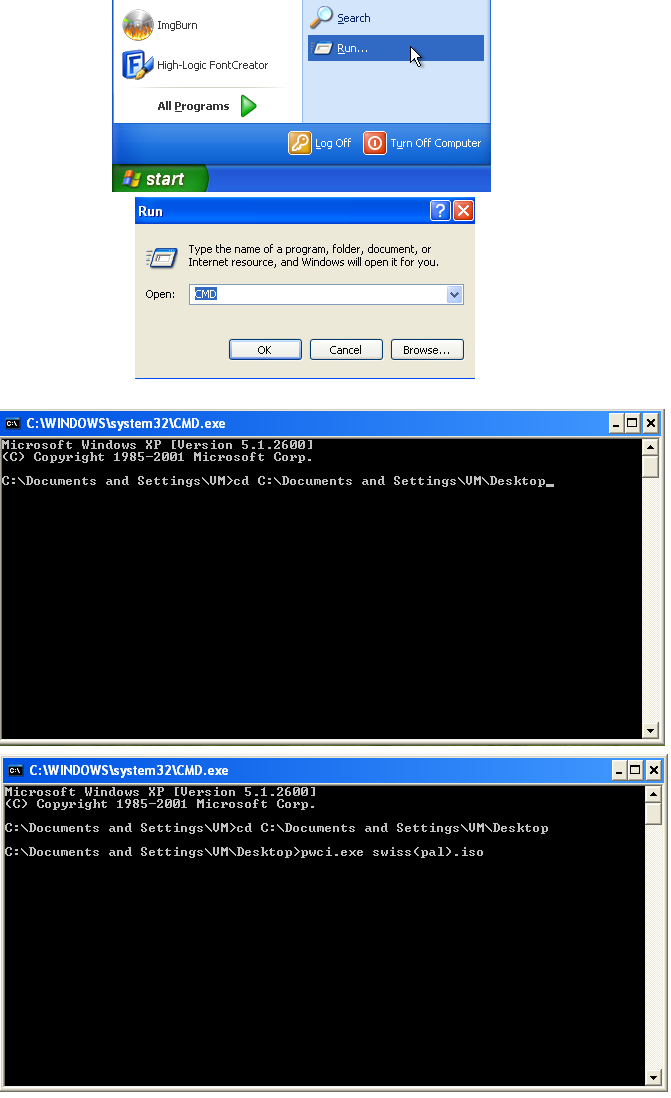
- pwci.png
- visual instructions
- (49.78 KiB) Not downloaded yet
Re: Wode Autoboot
Posted: Mon Nov 26, 2012 8:51 am
by Benni
Thank you very much!
Now i only need you Adaptor!
Re: Wode Autoboot
Posted: Thu Jan 10, 2013 5:21 am
by megalomaniac
hmmm....dont know why i didnt think of this before....
its a windows program....
just grab the iso, drag and drop it on pwci.exe...done!!
Re: Wode Autoboot
Posted: Thu Jan 10, 2013 9:31 am
by Benni
lol!
i will check when all cables are available and everything is done.
So 2025 i think....